Introduction
Cloud gaming can feel like magic. You tap “Play,” and a high-end game appears on a phone, laptop, or TV. No console required. No GPU upgrades. Still, the experience depends on your internet more than any other factor.
This guide breaks down the pros and cons of cloud gaming services in clear language. You’ll learn what works, what fails, and how to choose the right setup for your devices, your games, and your connection.
This guide breaks down the pros and cons of cloud gaming services in plain language. You’ll learn what works, what fails, and how to choose the right setup.
What Cloud Gaming Is (and What It Isn’t)
Cloud gaming (also called game streaming) runs the game on a remote server. You receive a live video stream. Your controller or keyboard inputs travel back to the server.
Cloud gaming is not the same as:
Downloading games to your device and playing locally
Remote Play from your own console or PC at home
Watching gameplay videos with no interaction
You should treat cloud gaming like a real-time video call. It needs stable conditions. It also reacts badly to network problems.
How Cloud Gaming Works
Cloud gaming follows a simple loop:
You open a cloud gaming app or supported browser.
The service assigns you a cloud GPU in a server region.
The server renders the game frames.
The system compresses frames using H.264, H.265, or AV1.
You receive the stream as video and audio.
You send inputs back in real time.
Two things decide your experience:
Latency (input delay)
Stability (jitter and packet loss)
Raw download speed helps. Still, stability matters more.
Pros and Cons of Cloud Gaming Services at a Glance
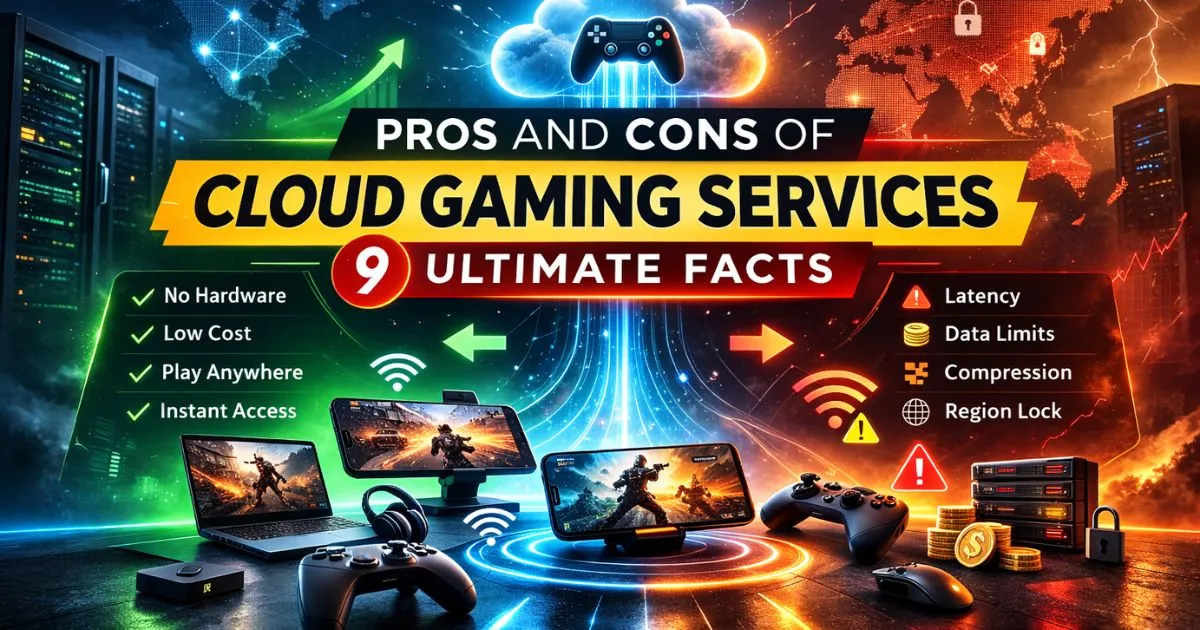
Here’s the fastest way to understand the pros and cons of cloud gaming services.
Quick Pros
Play on cheap devices
Skip hardware upgrades
Switch devices easily
Reduce installs and storage pressure
Access high settings with cloud GPUs
Quick Cons
Input lag can ruin gameplay
Data caps can increase costs
Compression can blur fast scenes
Availability varies by country
Libraries change due to licensing
The Biggest Pros
Cloud gaming shines when you value convenience and flexibility.
1) You avoid expensive hardware
A cloud GPU does the heavy work. Your device becomes a screen and controller hub.
This benefit matters if you:
Use an older laptop without a dedicated GPU
Don’t want a console cycle
Prefer subscription-style access
Many people try cloud gaming for this reason alone. It often justifies the monthly price.
2) You start faster and manage less storage
Cloud gaming reduces friction.
You install fewer huge files.
You avoid constant local patching.
You save storage for other apps.
You still need updates on the service side. Yet your device stays lighter.
3) You can play across devices
Cloud gaming supports flexible habits:
Phone on the couch
Laptop at a café
TV in the living room
Tablet in bed
This portability is a key part of the pros and cons of cloud gaming services. It also explains why travelers love it.
4) You can get “high-end” visuals on low-end devices
Cloud hardware can push higher settings than your local device. You can also see higher frame rates on stronger tiers.
You will still hit streaming limits:
Stream resolution caps
Bitrate limits
Network constraints
Even so, many players prefer the convenience over perfect fidelity.
5) You can discover games with less commitment
Catalog-based services feel like “Netflix for games.”
You test more genres.
You reduce buyer’s remorse.
Families can share variety.
This works well for mixed households. It also helps B2B use cases, like demos.
The Biggest Cons (Deal-Breakers)
Many users quit cloud gaming because they ignore the deal-breakers. The pros and cons of cloud gaming services hinge on network reality.
1) Latency can break competitive play
Latency adds delay between input and response. Competitive genres punish delay.
Worst-fit genres
Competitive FPS
Fighting games
Rhythm games
A small delay can cost you a match. Local hardware stays the safer choice.
H3: Pros and cons of cloud gaming services for competitive play
Cloud gaming can work for casual matches. It struggles in serious ranked play.
Pros
You can practice anywhere.
You can play without installs.
Cons
Input delay can feel inconsistent.
Jitter can ruin timing.
Bluetooth controllers can add delay.
If you care about precision, test first. Do not commit blindly.
2) Jitter and packet loss cause “random” issues
Speed tests rarely show this well.
Jitter makes latency jump around.
Packet loss drops data packets.
These issues create:
sudden stutters
blurry resolution drops
audio pops
disconnects
Cloud gaming exposes weak Wi-Fi fast.
3) Data usage can get expensive
Cloud gaming is always-on video streaming. It can consume a lot of data.
This becomes a problem when you have:
ISP data caps
mobile “fair use” policies
peak-hour throttling
shared household connections
This point is central to the pros and cons of cloud gaming services. Always check your plan details.
4) Compression can reduce clarity
Cloud gaming uses video compression. You may notice:
macroblocking in dark scenes
banding in gradients
blur during fast motion
Some codecs handle motion better than others. Still, local rendering usually wins on clarity.
5) Region availability and server distance limit performance
Services vary by country and server region coverage. Even within a country, routing can differ by ISP.
When you sit far from a data center region, you often see:
higher latency
lower bitrate
more stream drops
Availability becomes a “first gate” decision.
6) Libraries can change due to licensing
Many services rotate games in and out. Some stream games you own. Others rely on catalogs.
That creates real risk:
your favorite game disappears
a title never arrives in your country
publisher support changes
This is why “library model” belongs high in your decision process.
7) You depend on servers and queues
Cloud gaming relies on platform uptime.
You can face:
maintenance windows
regional outages
peak-hour queues
session limits on some tiers
Local gaming stays playable without a server handshake.
Cloud Gaming vs Console vs PC
Use this table to compare options quickly.
| Factor | Cloud Gaming | Console | Gaming PC |
|—|—|—|
| Upfront cost | Low | Medium | High |
| Monthly cost | Often subscription | Optional subscription | Upgrades over time |
| Latency risk | High | Low | Low |
| Offline play | Limited | Strong | Strong |
| Modding | Limited | Limited | Strong |
| Visual consistency | Network-dependent | High | High |
| Portability | High | Medium | Medium |
If you want reliability, choose local hardware. If you want flexibility, cloud gaming can win.
Types of Cloud Gaming Services
You’ll see two main models.
Bring-your-own-games streaming
You connect your existing game libraries where supported. You stream supported titles from your accounts.
This model fits you if you:
already own many PC games
want cloud convenience without rebuying
prefer long-term ownership
Catalog-based streaming
You pay for access to a rotating catalog. The service controls availability.
This model fits you if you:
like discovery
want predictable monthly spending
do not mind rotation
Most people end up using a hybrid approach. They combine cloud and local play.
Major Cloud Gaming Platforms People Compare
When people search the pros and cons of cloud gaming services, they often mean specific platforms.
Common platforms include:
NVIDIA GeForce NOW
Xbox Cloud Gaming (xCloud)
PlayStation cloud streaming / PlayStation Plus Premium
Amazon Luna
Always verify:
supported countries and server regions
device support (smart TVs, streaming sticks, browsers)
controller support (Xbox controller, DualSense)
library model (owned games vs catalog)
[External DoFollow Link: NVIDIA GeForce NOW System Requirements]
[External DoFollow Link: Xbox Cloud Gaming Official Page]
Cloud Gaming Fit Score: 5-Step Decision Test
Use this test before you subscribe. It simplifies the pros and cons of cloud gaming services into a practical answer.
Step 1: Check availability in your country
If the platform is not officially supported, expect issues. You may still connect. Yet performance may suffer.
Step 2: Test stability during peak hours
Test in the evening and weekends. That is when congestion hits.
Look for:
stable ping
low jitter
no packet loss spikes
Step 3: Match the service to your library model
Ask a simple question:
Do I want to stream owned games or a catalog?
Pick the model that fits your habits.
Step 4: Confirm your device and controller setup
Cloud gaming works best with:
wired Ethernet, when possible
strong 5GHz Wi-Fi or Wi-Fi 6
a reliable controller
Wired controller connections can reduce latency. Bluetooth adds delay in some cases.
Step 5: Run a real-world trial
Play for 30–60 minutes.
Try fast scenes and aiming.
Try peak hours.
Try on your primary device.
If the stream feels stable, you can commit.
[Internal Link: Cloud Gaming Internet Requirements Guide]
How to Reduce Lag and Stuttering
If cloud gaming feels “off,” start here.
Fixes that usually help
Use Ethernet instead of Wi-Fi.
Switch to 5GHz or Wi-Fi 6.
Move closer to the router.
Close background downloads and streams.
Lower stream resolution or frame rate.
Use native apps when available.
Router and network tweaks
Enable QoS to prioritize game traffic.
Pick a less crowded Wi-Fi channel.
Keep the router in an open, central spot.
These steps improve stability. They also reduce jitter.
Data Usage and Cost Reality
Costs are not just subscription fees. You also pay for the network experience.
What drives total cost
subscription tier
queue priority and session limits
resolution and frame rate caps
ISP costs and data caps
mobile data policies for 5G hotspots
How to estimate your own data use
Do this instead of trusting generic claims:
Stream for one hour at your target settings.
Check router or ISP usage logs.
Multiply by your weekly play time.
This method fits your bitrate and codec behavior. It also reflects your real habits.
Image Placeholder
[Image: pros and cons of cloud gaming services comparison setup on TV, laptop, and mobile]
Common Mistakes to Avoid
Most problems come from expectations and setup.
Avoid these mistakes:
Testing only at noon, not peak hours
Playing on weak 2.4GHz Wi-Fi
Ignoring ISP throttling and data caps
Choosing a service before checking supported countries
Expecting competitive FPS to feel identical to local hardware
Cloud gaming can feel excellent. It can also feel inconsistent. Your network decides.
Who Cloud Gaming Works Best For
Cloud gaming fits different needs across B2C and B2B.
Best fit
casual gamers
single-player and co-op players
budget-focused users
travelers and students
households that share devices
teams that need quick demos across devices
Think twice if you…
mainly play competitive FPS or fighting games
have frequent internet drops
rely on capped mobile data
live far from supported server regions
This is the practical heart of the pros and cons of cloud gaming services.
FAQs
1) Is cloud gaming worth it in 2026?
It is worth it when you have stable internet. It shines for casual and single-player games. It often fails for competitive genres and unstable networks.
2) Why does cloud gaming lag with fast internet?
Fast speed does not guarantee stability. Jitter, packet loss, Wi-Fi interference, and ISP routing cause delay. Cloud gaming reacts badly to these issues.
3) What internet speed do I need for cloud gaming?
You need enough bandwidth for your target resolution. You also need stability. Ethernet or strong 5GHz Wi-Fi usually works best.
4) Does cloud gaming use a lot of data?
Yes. It streams constant video. Higher resolution and frame rate use more data. Data caps can raise your total cost quickly.
5) Is Ethernet better than Wi-Fi for cloud gaming?
Yes, in most cases. Ethernet reduces interference and variability. If you use Wi-Fi, choose 5GHz or Wi-Fi 6.
6) Can cloud gaming replace a console or PC?
It can replace local hardware for many casual players. It rarely replaces local hardware for competitive play, offline needs, or modding.
7) Do I own games on cloud gaming services?
It depends on the platform. Some let you stream supported games you already own. Others offer catalog access that can change over time.
8) What happens if a game leaves a cloud catalog?
You lose access to that game through the catalog. You may still buy it elsewhere, but the streaming library may not include it.
Conclusion
The pros and cons of cloud gaming services are simple in theory. Cloud gaming gives you instant access, device flexibility, and fewer hardware costs. It also demands stable internet, low jitter, and sensible data policies.
If you can play on Ethernet or strong 5GHz Wi-Fi, cloud gaming can feel excellent. If you rely on unstable networks or capped data, it can frustrate you. Run the 5-step test, confirm availability, and trial before you commit.